Multi-Mode: Rethinking Fixed Camera Views
When it comes to 360-degree surveillance, Oncam’s fisheye camera range delivers a flexible and high-performance foundation for complete scene coverage. Designed with a compact form factor, these cameras are powered by a Qualcomm Technologies SoC, enabling high frame rate streaming alongside advanced capabilities such as TrueDetail HDR, StreamLite+ compression, and Advanced Light Management.

Built on decades of expertise in panoramic imaging, Oncam has evolved the traditional 360-degree camera into a more dynamic and adaptable solution. Through advanced onboard edge-based dewarping and Multi-Mode capabilities, a single fisheye capture can be transformed into multiple, purpose-driven views.
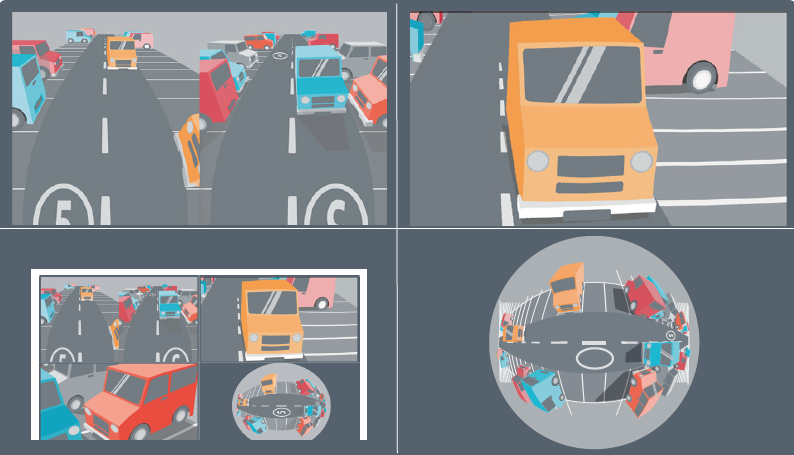
With Multi-Mode, up to four simultaneous streams can be generated from a single fisheye camera, each optimized for a specific operational requirement:
- Fisheye: the native 360-degree view, delivering full scene coverage and complete situational awareness, ideal for retrospective investigation.
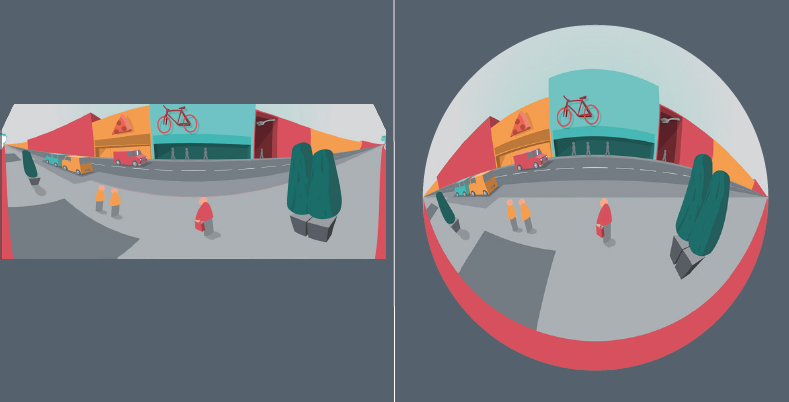
- Panoramic+: a 5:2 pre-dewarped panoramic view designed for wall-mounted cameras, using the center of the fisheye sensor to generate a true 180-degree image. When installed at an angle, Angle Compensation Technology (ACT) and Scene Offset are used to optimize the image, providing a more natural representation of the scene.
- Corridor+: a split two-way corridor view from a ceiling-mounted camera, enabling simultaneous monitoring in both directions with no blind spots, ensuring objects and individuals move seamlessly between views.
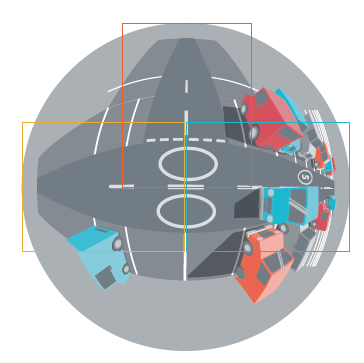
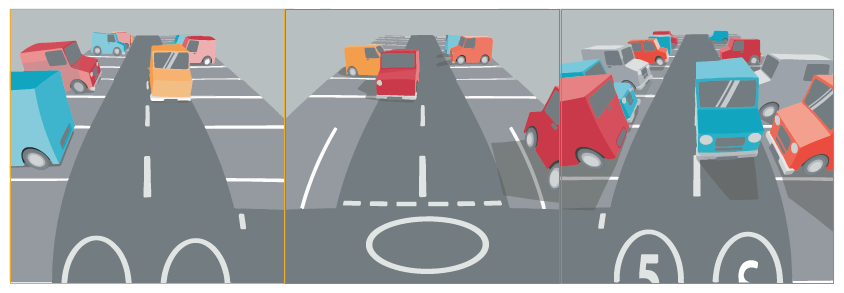
- T Corridor+: a three-way junction view from a ceiling-mounted camera, allowing visibility in three directions at once with no gaps in coverage. Scene Offset ensures each view is correctly aligned and centered.
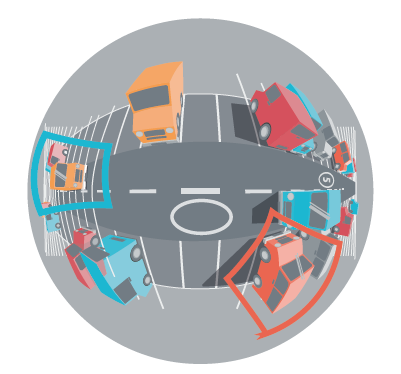
- VCam: a user-defined dewarped view focused on a specific area within the fisheye image, allowing operators to prioritize key zones while maintaining full-scene recording.
Multi-Mode enables continuous recording of the entire scene through the fisheye stream, while simultaneously providing additional dewarped views for more intuitive live monitoring. For example, the full 360-degree view can be used for investigation and playback, while dewarped views are displayed in a control room for real-time operations.
Streaming flexibility extends further, with the ability to run different streams at different frame rates, allowing users to determine which views are prioritized for live monitoring or recording.
This approach provides a highly adaptable solution that can be tailored to specific use cases. A single fisheye camera can operate as a 360-degree device, a panoramic camera, or a combination of both, with multiple views delivered simultaneously. It can support one stream at up to 60 fps, or multiple concurrent streams at up to 30 fps, and can be deployed across both indoor and outdoor environments.
Let’s now take a look at each view in more detail…
PANORAMIC+
Trying to get a great panoramic image from a surveillance
camera can prove difficult, often depending on the type of
camera being used and your needs:
- Multi sensor cameras can generate a panoramic image by combining the images from each sensor. However, this can lead to several issues, from stitching, to alignment and light imbalances, or it can can even have blind spots – especially under the camera when mounted in ceiling mode. They tend to provide a higher overall resolution but are much larger units and aren’t always suitable for indoor installations where aesthetics or size may be important.
- Conventional lens cameras can generate panoramic images, but rarely cover a full 180-degree field of view, leaving blind spots on the edges of the image.
- Fisheye cameras can cover a 180-degree field of view, don’t suffer from the issues mentioned above, and give best results when wall mounted. Unfortunately, they can still cause problems with orientation and distortion if the camera is not mounted at head height, as the camera needs to be tilted, which could cause unnatural looking images.
Panoramic+ solves the issues of standard fisheye cameras
and offers a compelling solution for true 180-degree
wall mount panoramas without suffering from stitching,
alignment, light balance or blind spots. Panoramic+ images
are a true edge-to-edge dewarped view of the original
fisheye image taken from the center of the scene with an
extended vertical field of view and a super-wide aspect
ratio of 5:2.
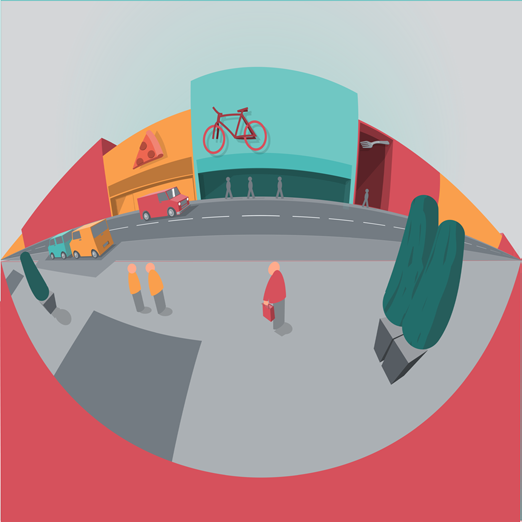
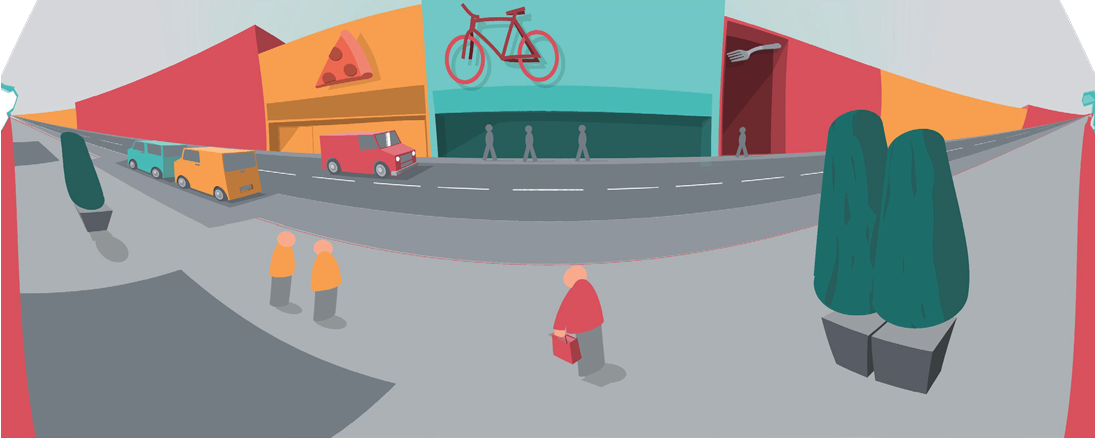
Often, for security reasons and to avoid tampering, surveillance cameras need to be mounted at a height. To make sure that the camera is looking in the right area, it needs to be tilted downwards, causing two types of panoramic distortion:
- The horizon appears curved, and vertical lines are not parallel. Oncam’s Angle Compensation Technology (ACT) solves these issues by aligning vertical lines and flattening the horizon.
- If the center of the camera is not pointing at what is most important in the scene. Scene Offset allows for the image to be electronically adjusted to tilt the panorama and focus on what matters most, making sure nothing is missed.
THE USE CASES
- Enhanced wide view on passing traffic and possibly at people’s faces because of the wall mounting (e.g., till area in a shop, corridor, desk area in a hotel lobby)
- Perimeter protection (wall of a building, fence etc)
THE BENEFITS
- Compelling solution for wall mounted panoramic installations, with Panoramic+ views and accessories for both indoor and outdoor tilted mounting
- The 5:2 Panoramic+ stream provides a perfect balance between image quality and bandwidth effciency, enhanced by the C-Series platform and ACT and Scene Offset
- True edge-to-edge 180-degree image from a single sensor camera, with no blind spots, stitching, alignment or light issues
CORRIDOR+
Imagine wanting to monitor two sides of a narrow scene without any blind spots. You could try to achieve it with two cameras, but this won’t give you a complete view, and certainly not one that is synced.
Corridor+ is a dewarped split two-way corridor view, with which you can see two perfect halves from the whole corridor image side-byside, allowing you to monitor both directions of the scene at the same time. With no gap in between those two images, objects and individuals will move seamlessly from one dewarped view to the other.
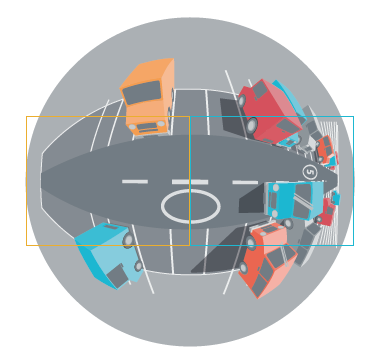
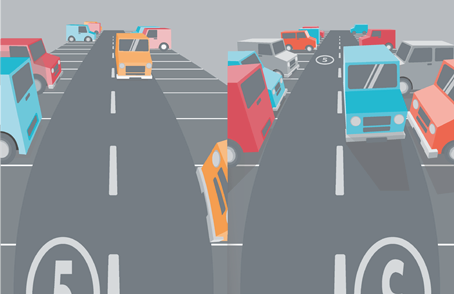
After set-up, you can adjust both halves of the image with Scene Offset by moving them from left to right, to ensure the full width of the corridor is captured.
THE USE CASES
- Indoor corridors
- Shopping center aisle
- Server farms
- Street surveillance
THE BENEFITS
- Nothing goes amiss: Corridor+ gives the dewarped views of two halves of a full panoramic image, guaranteeing complete coverage of a corridor with no blind spots
- Gives two natural looking views of both directions of a corridor
- Save bandwidth by focusing on what matters most
T CORRIDOR+
How do you monitor a space when you want to focus on
three specific directions and have a complete view of all of
them simultaneously?
In these cases, camera placement becomes critical: you’d
have to place multiple overlapping cameras in multiple
directions to ensure no blind spots.
Afar more elegant solution is to use a ceiling mounted
360-degree camera with a three-way corridor view like T
Corridor+.
T Corridor+ focuses on three directions of the scene
without leaving any gaps or blind spots, and individuals or
objects are captured seamlessy as they pass between the
three different views.
THE USE CASES
- Lift lobby
- Street surveillance
- Corridor junction (hotels, hospitals, Universities /schools, subway stations)
THE BENEFITS
- Nothing goes amiss: T-Corridor+ gives the dewarped
views of three directions of a 360-degree image - Complete coverage of a junction with no blind spots
- Gives three natural looking views of a corridor junction
- Save bandwidth by focusing on what matters most
VCAMS
Often, you want to focus the camera on a key location in
your scene.
To do that, you can use a Narrow Field-of-View (NFoV)
camera permanently pointed in that direction, but by
doing this, everything else that happens outside that
field of view goes unseen unless there’s a second,
360-degree camera capturing the rest. This problem can
be solved with a 360-degree camera feauturing VCams.
A VCam or “Virtual Camera”, is a dewarped view of a
specific section of the 360-degree image.
The benefit of using aVCam is quite simple: while the
360-degree camera has a view of the entire scene, the
VCam gives a natural-looking view of a specific area,
which can be streamed separately, for example for live
monitoring on a screen.
This becomes particularly powerful when combined with
a retrospective view: recording the entire 360-degree
image captures what happened elesewhere in the
scene at the time of an incident, focusing beyond what
It is just visible in the VCam.
Up to 4 separate VCams can be created, or up to 3 alongside the fisheye stream.


THE USE CASES
- Lift lobby
- Street surveillance
- Corridor junction (hotels, hospitals, Universities /schools, subway stations)
THE BENEFITS
- Dewarped view of a particular portion of the 360-degree image
- Focus on one particular area, without losing the overall view being recorded with the 360-degree view
USE CASE EXAMPLES

The Future of Video Surveillance Reimagined
Video surveillance can be complicated, expensive and difficult to scale. At Oncam, we believe it doesn’t have to be that way. By leveraging the power of the cloud with cutting edge AI, Oncam is putting real-time visibility and control at your fingertips.
For more details visit: Oncam.net